Fill PDF Form Online Free - Fill In and Sign Any PDF
Drop any PDF form, fill it in, sign it and download. Works on forms with fields and on forms without them.
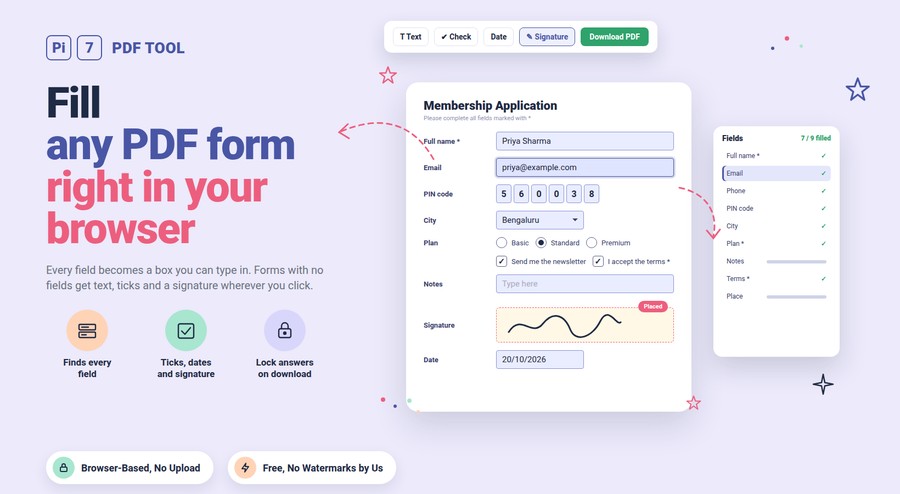
Fill in PDFs online for free with the Pi7 PDF form filler. Drop the form and every text box, checkbox, radio button, dropdown and list becomes a field you can type in right on the page. If the PDF has no fields at all, click anywhere to type into the PDF, tick a box, add today's date or sign it. The completed form downloads with your answers locked in, and nothing is uploaded. There is no sign-up and no watermark.
Most forms people get by email fall into two groups. Some were made as fillable forms, so they already have boxes. Even then, a phone or a basic viewer may not let you type in them, or may lose what you typed when you save. Others are plain PDFs of a printed form, and the only way to fill those is to type over the lines. This page handles both without printing anything.
How to Fill Out a PDF Form Online
- Select the PDF: Drag it onto the box above or click "Select PDF". Password-protected forms ask for the password once.
- Fill the fields: Click any blue box on the page and type. The "Fields" list on the side shows every box in order and counts how many are done. "Next empty" jumps to the next one you skipped.
- Add what the form has no box for: Pick Text, Check, Cross or Date in the toolbar and click where it should go. A small bar above a text box sets its font, size, bold, italic and colour. Six fonts are included: Helvetica, Times, Courier, Inter, Merriweather and EB Garamond. The last style you used is kept for the next box. Press Enter inside a text box for a new line, and the box grows with your text. Drag to move it and pull the corner to resize.
- Click "Download PDF": With "Lock answers" ticked the answers are written into the page so nobody can change them. Untick it if the next person needs to edit the boxes.
The file is saved as your original name with "-filled" added, in the same page size as the form you opened.
How to Fill and Sign a PDF Online
Most forms end with a signature line, so signing is built into the same page instead of being a separate tool. Click Signature in the toolbar. Draw your signature with a mouse or finger, or type your name in one of eight handwriting fonts. You can also upload a photo of your signature, and the paper background is removed for you. Saved signatures are one click away. A faint copy follows your cursor until you click the signature line. After that you can drag it, resize it or swap it from the bar above it. Forms with a built-in signature field show a yellow "Sign here" box that places the signature exactly inside it.
Signatures made here are saved in your browser and shared with our signature tool with an audit trail. Use that tool when a contract needs tamper evidence. For a form you only need to fill and sign once, everything happens on this page: fill the boxes, sign, download.
Which Kinds of PDF Forms Can It Fill?
- Fillable forms (AcroForm): Text boxes, multi-line boxes and boxes with one letter per cell. Checkboxes, radio buttons, dropdowns you can type into, and lists where you pick several options. Limits set by the form, such as a 6-digit PIN box, are kept.
- Forms with no fields: Scanned forms, printed forms saved as PDF, and forms where the boxes were flattened. Use the Text, Check, Cross and Date tools to put your answers on the lines.
- Reader-only (XFA) forms: Forms built in the XFA format show a "Please wait" page in browsers and open only in the reader they were made for. Pi7 draws them with its own XFA engine so you can fill every box here. The download is a normal PDF with your answers on the pages, so it opens in any viewer. Untick "Lock answers" to keep the original form file instead, with the answers saved inside it. The form's own Clear and Validate buttons work here, and Validate checks the fields marked with a star. Calculations or checks scripted into the form do not run.
- Signature fields: A yellow "Sign here" box marks each signature field. Click it to draw, type or upload your signature, and it is placed exactly in the box. For contracts with a full audit trail use the Sign PDF tool instead.
- Long forms: A 2-page tax form with 199 fields opens in about two seconds on a laptop. Fields that share a name are filled together on every page.
Why Do My Answers Disappear When I Save a Filled PDF?
Some viewers store what you typed only in the field data and never draw it on the page. Another program then opens the file, finds no drawing for the box, and shows it empty. Pi7 rebuilds the drawing for every field it writes, so the text shows in any viewer, on any phone, and when printed. Ticking "Lock answers" goes one step further and turns the fields into normal page content. That is what most offices, schools and government portals expect when you upload a form.
Keep "Lock answers" off when the form will go to someone who must add their own part, such as a counter-signature or an office-use section.
Fill the Same Details Faster
Click "My details" once and save your name, email, phone, address, PIN code and date of birth. They stay in your browser only. On every new form, "Save and fill fields" drops them into the empty boxes whose label matches. You check the result in the field list. Fields that already have a value are never overwritten.
Signatures you draw, type or upload are saved in the same browser too. They are shared with the PDF signing tool, so you make one signature and use it on every form. The last-used signature is placed when you click, and the "Saved" tab in the signature window lets you switch.
Your Form Never Leaves Your Browser
No upload, no account. The PDF is read, filled and rebuilt by JavaScript inside your tab, and the download is created there too. Names, ID numbers, bank details and signatures are never sent to Pi7 or anyone else. Close the tab and the form is gone from memory. Your saved details and signatures live in your own browser's storage, and "Forget details" wipes them.
Because there is no server there is also no page limit, no daily quota and no watermark. That is why you can fill PDF forms online here as often as you like, with files as private as a form filled by hand.
Need the finished form smaller for an upload limit? Run it through the reduce PDF size tool after filling, in case a signature image or an added font has made it heavier.
Frequently Asked Questions
How do I fill in a PDF that is not fillable?
Open it here, pick the Text tool, and click on the line where the answer goes. A box appears and you type into the PDF right there, with Enter for a new line. Use Check for tick boxes, Date for today's date and Signature to sign. Download when done, and the answers are part of the page.
Can I fill a PDF form on my phone?
Yes. Open this page in Chrome or Safari, pick the form from your files, and tap any box to type. The "Field list" button opens a drawer with every field in order, which is easier than zooming around a small page. The filled PDF saves to your phone.
Why does the form open blank in my browser but has fields in this tool?
That is an XFA form, the kind that shows "Please wait" and asks for a specific reader. Browsers cannot draw its dynamic layer. Pi7 draws it with the pdf.js XFA engine, so you can fill every box here. If the form also carries standard fields, those are filled and the download is a plain PDF. If it is dynamic only, "Download PDF" turns it into a normal PDF with your answers on the pages. That copy opens in Chrome, on a phone or at a print shop. Untick "Lock answers" to get the original form file with your answers stored inside it. The stamp tools are off for dynamic forms, and calculations or checks scripted into the form do not run here.
Will the recipient be able to edit my answers?
Not when "Lock answers" is ticked, which is the default. The answers become part of the page like printed text. Untick it to keep the boxes editable.
Is this PDF filler free, and do I need to sign up?
It is free with no account, no sign-up and no watermark, and there is no limit on pages or on how many forms you fill. Nothing is uploaded, so there is no server to pay for and nothing to throttle. Dropdowns, multi-select lists, checkboxes and radio buttons are all included, not kept behind a paid tier.
Have a form waiting? Drop it above, fill it in, sign it, and download it with the answers locked in.