Change PDF Page Size to A4
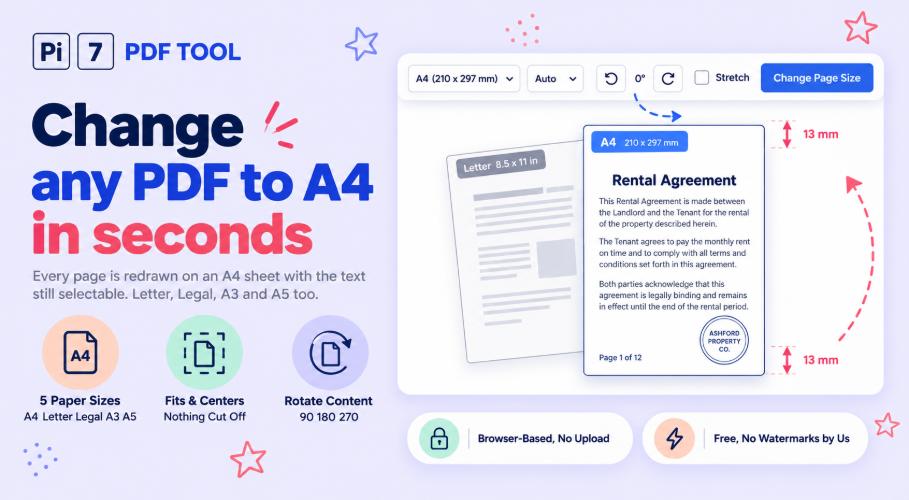
Drop a PDF above, click Change Page Size, and every page is redrawn on an A4 sheet - right in your browser. The content is fitted and centered, the text stays selectable, and nothing is uploaded anywhere. You can pick Letter, Legal, A3 or A5 instead of A4 with the same click.
How to Change PDF Page Size to A4
- Drag your PDF onto the box above, or click Select PDF to pick it.
- A4 is already chosen. Pick another size, or another direction, if you need one.
- Click Change Page Size. The work runs on your own device in a few seconds.
- Click Download PDF on the result card. Every page in it is now the same size.
Pages that are already exactly A4 are left alone, and the result card tells you how many were.
Page Size Is Not File Size
These two get mixed up a lot, so here is the difference in one line. Page size is how big the sheet is when you print it - A4, Letter, and so on. File size is how many KB or MB the file takes on your phone. This tool changes the sheet. If a website is telling you the file is too big in KB, you need our PDF size reducer instead.
What Happens to Each Page
Every page is placed on a fresh sheet of the size you picked, scaled to fit, and centered. Nothing is cut off. If the shapes do not match, you get even white space on two sides instead. A US Letter page on A4 comes out with about 13 mm of white at the top and bottom - Letter is a little wider and shorter than A4. We measured that on the tool itself, not on paper.
Direction is handled page by page when you leave it on Auto: a sideways page goes on a sideways A4 sheet. A report with one wide table in the middle keeps that table big and readable. Tick Stretch to fill the sheet only when white space matters more than shape, because stretching can squash letters and photos.
Quality does not drop. The page is not turned into a photo of itself. Drawings stay drawings and text stays text, so you can still select and copy every word. Two things do not carry over: fill-in form boxes and tappable links. The words from them stay on the page, but the boxes stop being typeable and the links stop being tappable. For a scan you plan to search later, run it through our PDF OCR tool after resizing.
When You Need Every Page the Same Size
Mixed page sizes cause quiet trouble. A printer flips between trays or shrinks pages on its own. A copy shop charges for the biggest page in the file. Court and college portals reject files that are not A4. Merged files look untidy when one half came from a phone scan and the other from a computer. Making every page A4 before printing or sending fixes all of these at once. If you also want two pages on each printed sheet to save paper, our 2 pages per sheet tool does that after this one.
Nothing Is Uploaded to Pi7
The whole job runs inside your own browser tab. Your PDF never travels to a server, so there is no copy of it anywhere to worry about and no waiting for an upload. You can watch your browser's network tab while it works and see that nothing is sent. Password-protected files are opened on your device too - you type the password, and it goes no further than your own screen.
Frequently Asked Questions
Will my pages look stretched or squashed?
Not unless you ask for it. The normal mode keeps every page in its original shape and adds even white space where the shapes differ. Only the Stretch to fill the sheet option changes the shape, and it stays off until you tick it.
What is the difference between A4 and Letter?
A4 is 210 x 297 mm and is the standard almost everywhere. Letter is 8.5 x 11 inches, which is 216 x 279 mm, and is used mainly in the US and Canada. Letter is about 6 mm wider and 18 mm shorter. That is why files from US sources print oddly on A4 printers - and why this tool exists.
Does the print quality get worse?
No. The page is redrawn, not re-photographed. Text, lines and shapes keep their full sharpness at any zoom, and photos inside the page keep the pixels they had. A page scaled down slightly, like Letter to A4, prints exactly as crisp as before.
Can I convert A4 to Letter, or make pages bigger?
Yes. Pick any size in the list - the tool scales up as happily as down. A5 pages become full A4 pages, and A4 becomes A3 for posters. Growing a scanned page a lot can soften it, because a scan only has the pixels it was scanned with.